LangChain vs LangGraph: When to Use Which (With Examples)
LangChain vs LangGraph: When to Use Which (Without Overcomplicating Your Project)
If you've spent any time building with AI lately, you've heard both names thrown around like they're interchangeable. They're not. And picking the wrong one can turn a one-day task into a two-week debugging mess.
Here's the simplest way to understand the difference, with real examples, minus the jargon.
The One Question That Decides Everything
Before you pick either tool, ask yourself one thing about what you're building:
"Does my workflow make decisions, or does it just follow steps?"
That single question tells you which framework you need. Let's break down both.
What Is LangChain?
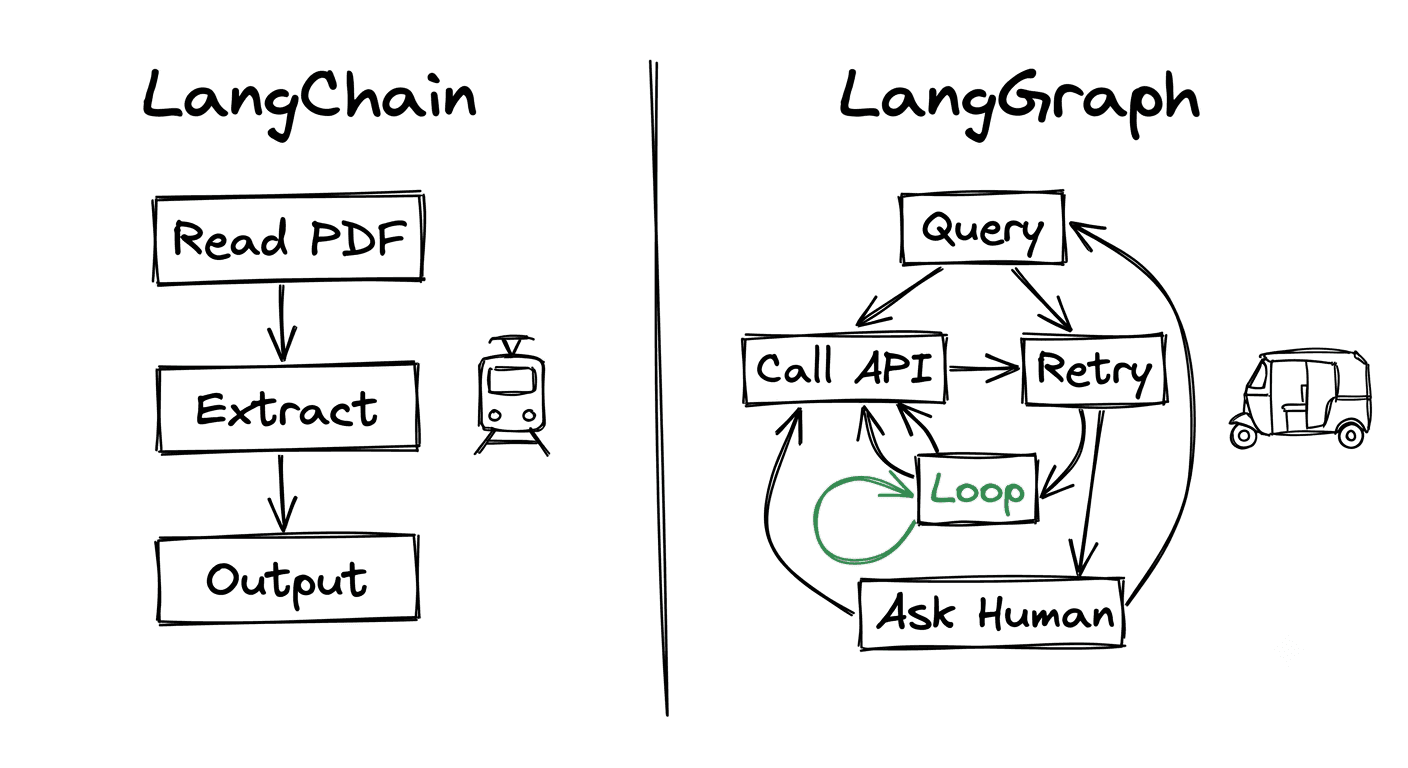
LangChain is built for sequential, predictable workflows. Think of it as a straight line: step 1 leads to step 2, which leads to step 3. Every run follows the same path. No detours, no loops, no decisions in between.
It's like a recipe. Do this, then this, then this, and you get the same result every time.
Real example - a resume screener:
Read the PDF → extract the candidate's skills → match them against the job description → output a score.
That's a straight line. Nothing branches. Nothing loops. LangChain handles this cleanly in just a few lines of code, and it's easy to debug because the flow never changes.
LangChain shines for:
- Document summarization
- Data extraction
- Simple RAG (retrieval-augmented generation) pipelines
- Translation workflows
- Any task where the steps are fixed and known in advance
What Is LangGraph?
LangGraph is built for workflows that need to think. Steps can loop, branch, retry, and make decisions in the middle of a run. The path isn't fixed, it changes based on what happens at each step.
If LangChain is a recipe, LangGraph is a conversation. "If the tool fails, retry. If confidence is low, ask again. If the user says X, go this way instead."
Real example - a customer support agent:
Read the query → does it need order data? → call the API → did the API fail? retry → still stuck? → escalate to a human → respond.
Notice the difference. This flow loops back on itself. It makes judgment calls. It reacts to what happens. This is exactly where LangGraph earns its complexity.
LangGraph shines for:
- AI agents
- Multi-step reasoning
- Tool-calling systems
- Workflows with retries and error handling
- Anything that needs to decide, adapt, or loop
The Easiest Way to Remember It
Think of it like transport:
LangChain is a train. Fixed track, fixed stops, completely reliable. It goes from A to B the same way every single time.
LangGraph is an auto-rickshaw in city traffic. Constantly rerouting, taking U-turns, making decisions at every turn based on what's ahead.
Both get you to your destination. The route you need decides which one to pick.
The Comparison at a Glance
| LangChain | LangGraph | |
|---|---|---|
| Structure | Linear (straight line) | Graph (branching) |
| Flow | Fixed, same every time | Dynamic, changes per run |
| Loops & branches | No | Yes |
| Best for | Predictable, step-by-step tasks | Decision-making, adaptive tasks |
| Complexity | Low | Higher |
| Debugging | Easy | Harder |
The Mistake Most Developers Make
Here's the trap: most people pick the framework first, then force their problem to fit it. Usually they reach for LangGraph because it sounds more advanced, and end up debugging loops and branches they never needed.
Do it the other way around.
Map your workflow on paper before writing any code. If you can draw it as a straight line, and most workflows can, keep it simple with LangChain. Only reach for LangGraph when your workflow genuinely loops, branches, or makes decisions.
Adding a graph framework to a straight-line problem isn't good engineering. It's just extra complexity you'll pay for later, in build time, in debugging, and in maintenance.
The Bottom Line
The skill in AI engineering isn't knowing the fanciest framework. It's knowing which one the task actually needs.
- Straight-line workflow → LangChain
- Decision-making workflow → LangGraph
Match the tool to the problem, not to how impressive it sounds. Your future self, the one who has to maintain this system, will thank you.
Building AI systems that need to understand context, make decisions, and handle real-world complexity? At Awshar AI, we work with these architectures every day.
Read Next
Why News & Research Platforms Need Social Intelligence
With a major incident breaking somewhere in India nearly every day, news and research platforms can't rely on traditional reporting cycles alone. Here's why they need social intelligence support.
Historical Data Social ListeningWhy Historical Data Matters in Social Listening
Real-time alerts get all the attention, but historical social data is what turns listening into strategy. Learn why past conversation is essential context, not old news.